Defect List Template: How Construction Professionals Actually Document Defects

Anyone who needs to document defects on a construction site often turns to what they’re familiar with: Excel. One row per defect, quickly add a photo at the end—done. The problem: This approach takes more time than it saves, and it’s of little help in court or in the event of a dispute. In this article, we’ll show you what a professional defect report looks like, what information it really needs to include—and why a Word-based report with a site plan excerpt and photos is far superior to the Excel approach.
What should be included in a list of defects?
A legally sound list of defects is more than just a table of keywords. The following information should be recorded for each documented defect:
- Clear description of the defect (e.g., “Door lintel bulging, axis 27/5”)
- Category (Defect, Damage, Safety Defect, etc.)
- Location on the plan: On which plan and at what location is the defect located?
- Status: Open, In Progress, Closed
- Photo(s) taken right at the time of the defect — with date and time
- Assigned Trade or Contractor
- Due Date
- Author and Date Created
- Comments and Communication History
It is possible to present all this information in Excel—but it's cumbersome. Photos and map excerpts, in particular, cannot be displayed effectively in a spreadsheet.
Why Excel Isn't the Best Choice for Defect Reports
Many construction managers and technical supervision offices still use Excel spreadsheets for their defect lists. The format is familiar: one row per defect, columns for status, trade, and due date—and a photo is squeezed into the last column.
In practice, this gives rise to some common problems:
- Photos must be dragged into cells manually and laboriously resized
- Parts of the plan are completely missing—the spatial context is lost
- Multiple photos per defect disrupt the layout
- Version Chaos: Who has which version? Is this still up to date?
- No location data: It is no longer clear exactly where the shortage occurred
- Not legally sound: In disputes, crucial details are often missing
The fundamental problem: Excel is a spreadsheet program, not a documentation system. It was never designed for construction site documentation.
What a Professional Defect Report Actually Looks Like
A professional defect report for everyday construction work is based on Word—not Excel. The reason is simple: Word can combine images, plan excerpts, and structured tables in a single document. The result is a report that holds up even when presented to external partners, building owners, or in court in the event of a dispute.
For each defect, such a report contains:
- The exact section of the plan showing the location of the defect
- All metadata (category, status, creator, date)
- All related tasks, including responsibilities and due dates
- The complete communication history (comments, status updates)
- Photos taken directly at the location of each defect—with the date and a caption
💡Real-world example from docu tools: A defect—“bulging door lintel”—is pinpointed on the exact floor plan, assigned to the painter, given a due date, and documented with photos of the defect—all in a single report that can be shared via a link or sent as a PDF.
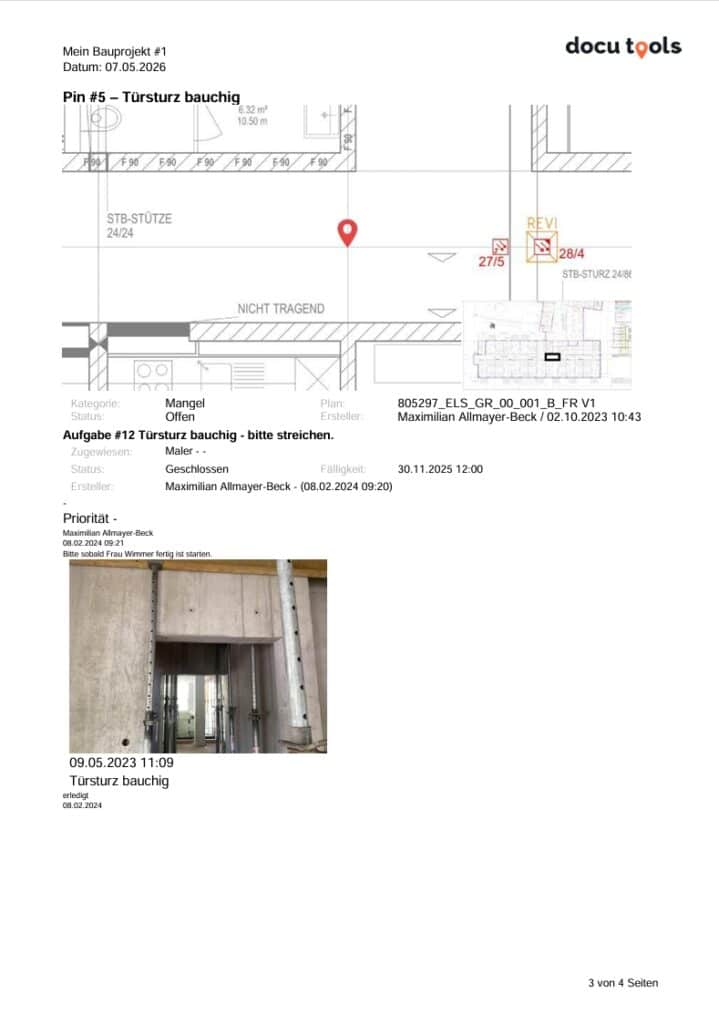
Download a Sample Defect Report (PDF)
Sharing a Defect Report — Three Practical Approaches
Once a report has been created, the question arises: How does it get to the recipient? In practice, three methods have proven effective:
| Method | Advantage | Note |
| 🔗 Share this link | Always up to date, no attachment needed — similar to OneDrive links | The recipient always sees the latest version |
| 📄 PDF via email | Universal—anyone can open it | With many photos, the size can quickly exceed 20 MB—sending large files via email can be problematic |
| 📝 Download Word | Final adjustments possible; custom branding | Snapshot only — subsequent changes to the software will not be applied |
For Germany: Defect reports compliant with VOB standards
Anyone working in public or commercial construction in Germany is familiar with the German Construction Contract Procedures (VOB). Defect reports that comply with the VOB must meet specific formal requirements—including those regarding the documentation of deadlines, the notification of defects, and the obligation to provide evidence.
Good construction documentation software offers dedicated report templates that already take these requirements into account—this saves you the trouble of manual formatting and ensures you're on the safe side.
What Sets docu tools Apart
docu tools is construction documentation software designed specifically for small and medium-sized architectural firms, construction managers, and civil engineers. Defects are marked directly on the construction plan as “pins.” Each pin can be tagged with photos, tasks, comments, and deadlines.
The defect report is then generated from these pins with a single click—including a map excerpt, photos, and the complete communication history. The result is a professional Word or PDF document that you can forward immediately.
The difference is immediately noticeable, especially for teams that have been working with Excel up until now: no manual photo imports, no versioning issues, and no missing plan locations.
Conclusion: Which template is the right one?
A list of defects in the form of an Excel spreadsheet is a good first step—better than no documentation at all. But if you want to work professionally and be on the safe side in the event of a dispute, you need more than just a spreadsheet:
- Plan Location for Each Defect
- Photos right next to the defect—not in a table cell
- Complete Communication and Status History
- A professional layout that you can forward right away
Digital construction documentation software like docu tools offers all of this—and making the switch is easier than you might think.
🚀 Try it for free now
Try Docu Tools free for 30 days — no credit card, no risk. Pinpoint defects on the plan, add photos, and create a professional report in seconds.
→ www.docu-tools.com/kostenlos-testen