Keeping a Digital Construction Log: What to Include—and How It Works with docu tools

The construction log is one of the most important documents on any construction site—and yet it’s often neglected. Too much to do, no time for entries. But when disputes arise over delays, the causes of defects, or additional costs, the construction log is what determines who is in the right. In this article, we explain what’s legally important, what absolutely must be documented—and how a digital construction log with docu tools works in practice.
What is a construction log, and why is it important?
A construction log is an ongoing record of daily activities at the construction site. It documents what has happened: weather conditions, trades present, progress of the work, special events, deliveries, and instructions. It is not a personal diary, but an official document with legal significance.
In Austria, the ÖNORM B 2110 standard explicitly recommends the construction log as evidence in the event of disputes—such as those regarding construction schedule extensions, cost overruns, or the causes of defects. In Germany, the VOB/B applies: Delays must be reported in writing, and the construction log is the practical way to do so.
⚖️ In short: If youdon't keep a construction log, you'll have almost no evidence in the event of a dispute. If you keep it digitally, you'll save time every day and have everything at your fingertips.
What should be included in each entry?
A complete construction log includes the following for each day:
- Date, Construction Day Report Number
- Weather conditions (temperature, cloud cover — relevant for obstruction reports)
- Participating Companies and Subcontractors
- Workforce: Foremen, Skilled Workers, Unskilled Workers, Machine Operators, Apprentices
- Work hours from/to
- Work Completed Today (What was done?)
- Special Incidents and Difficulties
- Photos of construction progress — with date and time
- Signatures of the Contractor and the Client
All of these fields are already set up in the docu tools standard daily construction report—you don't have to set anything up yourself.
How does the construction log work in docu tools?
docu tools doesn't have a separate construction log module—instead, it uses a clever approach that leverages the existing pin system. The result is a complete, professional daily report with minimal effort. Here's how it works, step by step:
Step 1: Import the calendar
The first step is to import an annual calendar into the project as a plan—just as you would normally upload a floor plan. Docu Tools offers the calendar as a free PDF download in several languages.
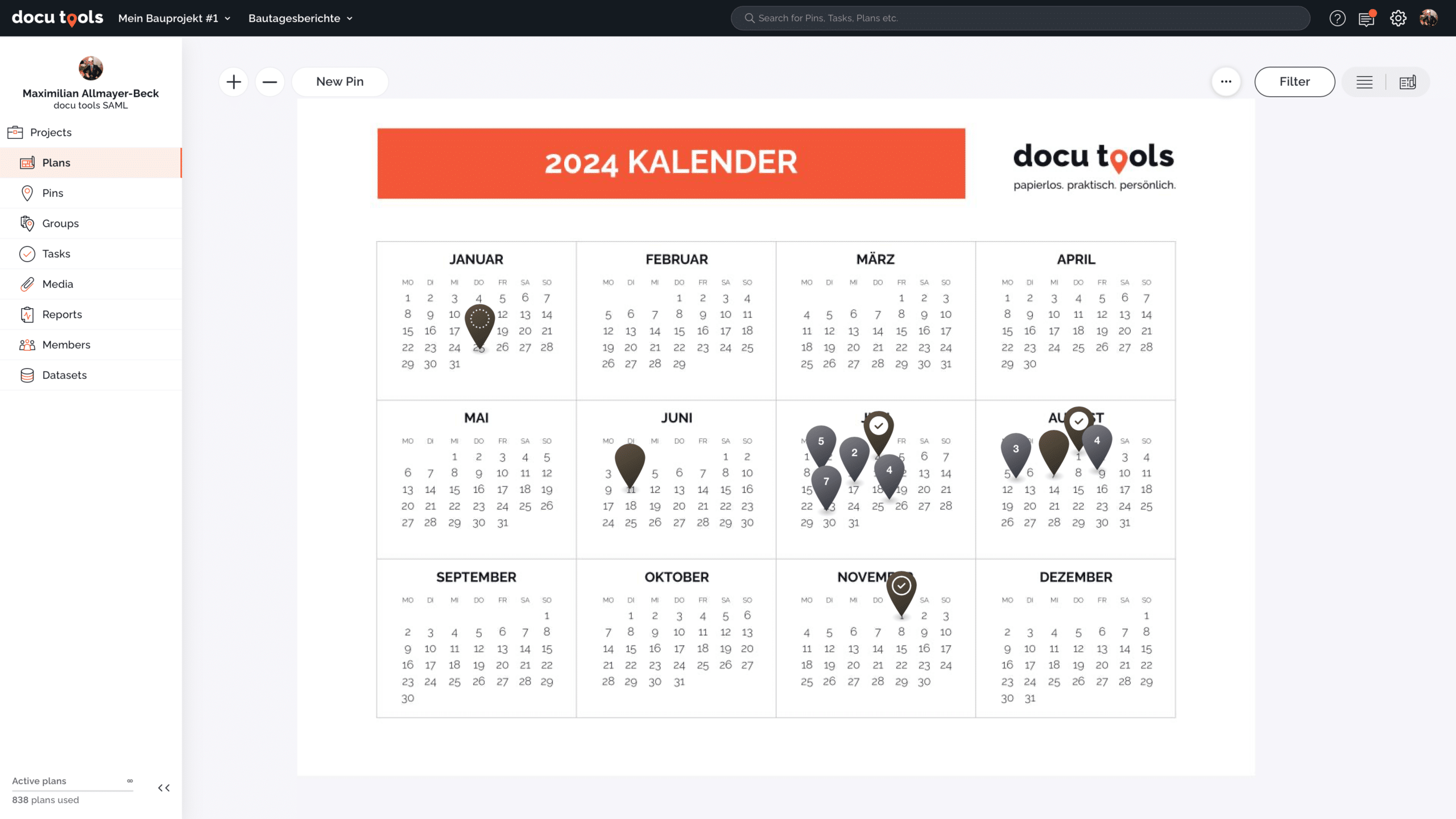
Screenshot: The calendar view in docu tools — each day is a pin location. At a glance, you can see which reports have already been created and completed
📌 One-time setup required: Thefields in the daily construction report (foreman, skilled workers, work performed, etc.) are not predefined in docu tools by default—since every office has different requirements. You need to create them once within the project. The advantage: You can structure your report exactly as you need it—with precisely the fields that are relevant to your office. Afterward, you save the project as a template and copy it exactly as is for each new construction project.
Step 2: Set a daily pin limit
For each workday, place a pin on the corresponding date on the calendar. Assign the category “Construction Day Report” to this pin—this automatically activates the predefined fields.
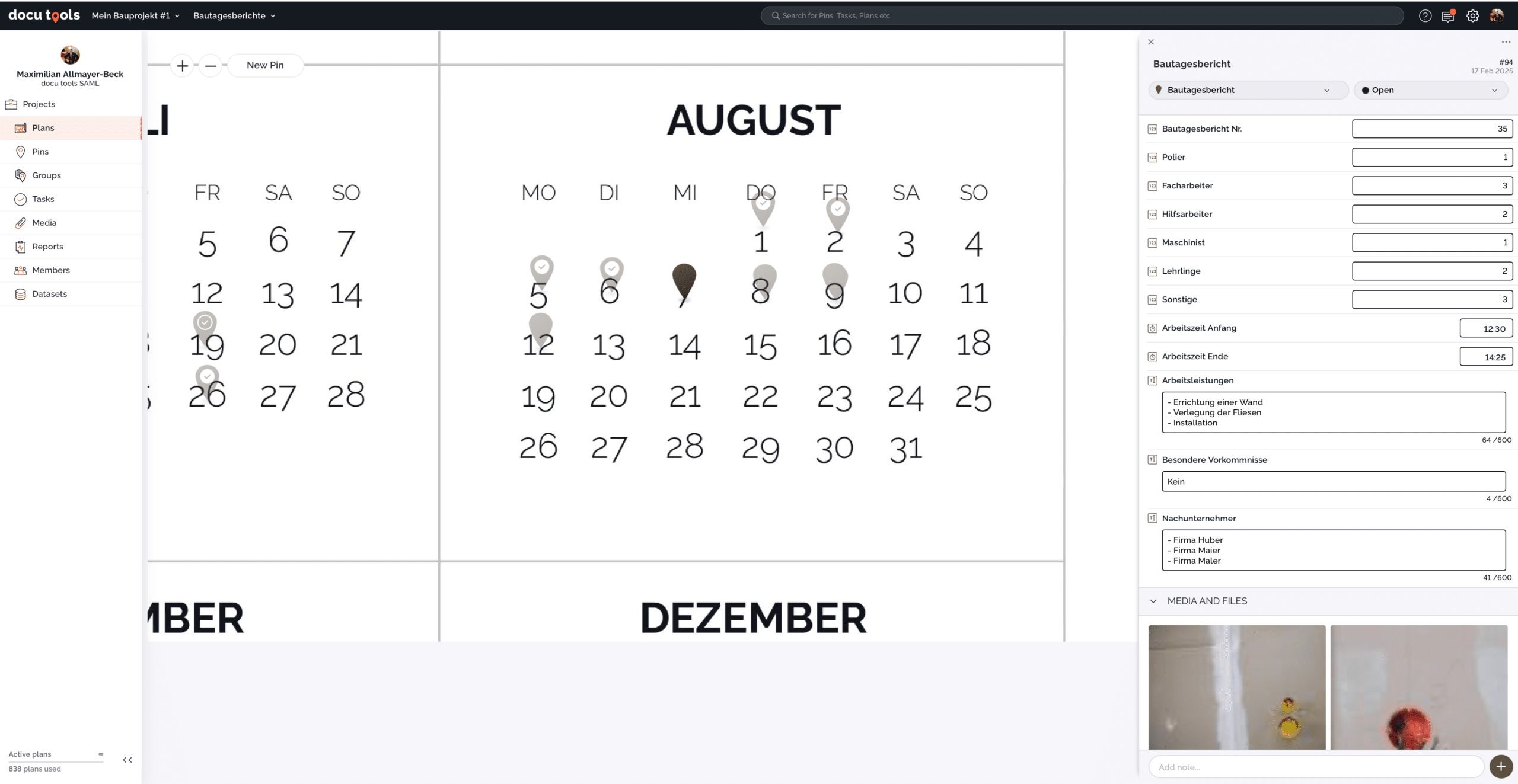
Screenshot: A completed construction day report pin in docu tools — all fields are visible on the right: Companies, Personnel Assignment, Working Hours, Work Performed, Incidents, and Photos.
Step 3: Create and send the report
With a single click, the pin is converted into a finished PDF report. This report can be shared directly from docu tools via a link, downloaded as a PDF, or—on an iPad—signed digitally and sent immediately.
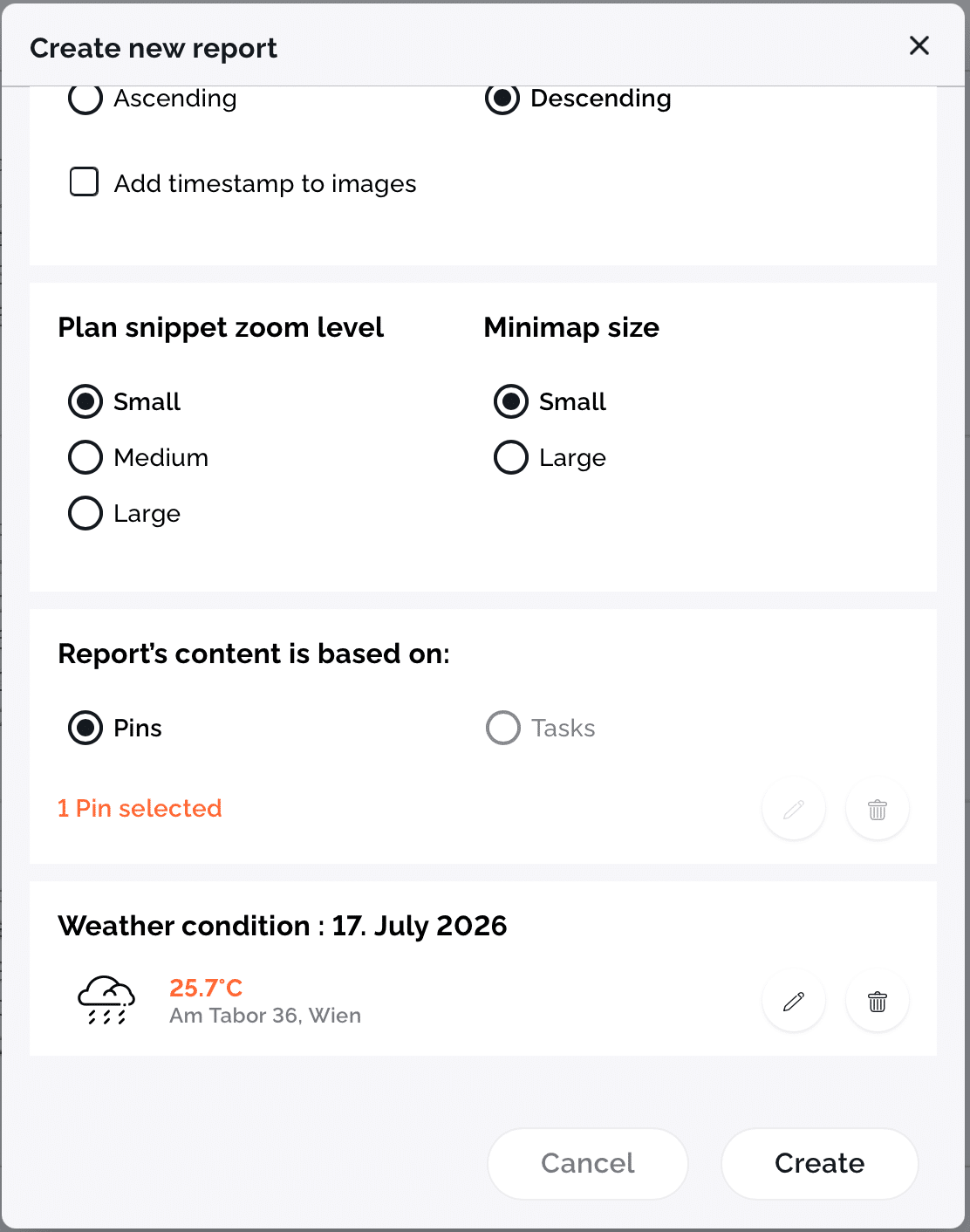
Screenshot: The “Create New Report” dialog — Weather data for the selected day is loaded automatically, and you can select pins and content.
The Most Important Benefits in Everyday Life
Anyone who regularly maintains a construction log using docu tools benefits from several practical features that significantly reduce the effort involved:
Copying your PIN saves time every day
From day to day, very little often changes—the companies present and the staffing assignments usually remain the same. In docu tools, you can simply copy a record from the previous day and just adjust the report number, the work performed, and any special notes. Anything that hasn’t changed doesn’t need to be re-entered.
Automatic weather data — even retroactively
The weather data is automatically loaded based on the location and date of the pin. If you haven't created the Thursday report by Friday, no problem: docu tools saves the weather data for each day, and you can use the previous day's weather when creating the report.
Completely offline on the construction site
The docu tools app works on iPhone, iPad, and Android smartphones even without an internet connection. You can take photos, fill out fields, and finalize the PIN—everything syncs as soon as you're back online.
Overview at a Glance
Completed reports appear in the calendar view with a checkmark. You can see right away: Which days have been documented? Which reports have already been sent? For August, there are 10 entries—7 of them checked off, 3 still pending.
Signature directly on the tablet
On the iPad, the daily construction report can be digitally signed immediately after it is created—by the contractor and the client’s representative on site. Alternatively, a sample signature can be saved in the template.
Conclusion: Digital Construction Log — Less Effort, More Safety
Keeping a daily construction log takes less than 10 minutes—if you have the right tool. With docu tools, the process is clearly structured: Set up the calendar once, place a pin every day, and generate a report with a single click. Done.
The fields are pre-filled, the weather is added automatically, and the report looks professional—whether as a PDF attachment, a link, or signed directly on the tablet.
🚀 Download a free calendar template
The annual calendar for docu tools is available as a free PDF download in German, English, and other languages. Simply download it, upload it to docu tools—and get started with your digital construction log right away.